

Affiliate Disclaimer: Some links in this article are affiliate links. This means if you click a link and make a purchase, SecVerse may earn a small commission — at no extra cost to you. We only recommend tools we genuinely believe in and that we consider useful for your cybersecurity learning journey. Our editorial opinions are never influenced by affiliate relationships.
Introduction :
I learned subnetting the hard way. It taught me that IP addressing cybersecurity mistakes are rarely loud — they just quietly send traffic to the wrong place.
I was configuring a network for a client when one of the subnets I had assigned was routing incorrectly. Packets were going to the wrong place. I spent two hours troubleshooting before I found the mistake: I had miscalculated the subnet mask by one bit. One bit. And that one bit was causing traffic to be sent to a completely different segment of the network.
That experience taught me something I have not forgotten: IP addressing is not administrative detail. It is the logical architecture of the network. Get it wrong and nothing works the way it should. Understand it properly and you can trace any network problem — and find any network weakness — by following the addresses.
Last week we covered TCP/IP and the OSI model — the layers that structure how data moves across a network. This week builds directly on that foundation. Now that you know how data is packaged for its journey, it is time to look at how every device on that journey gets a unique address, how networks get divided into manageable pieces, and how a name like secverse.net becomes an address a computer can actually use.
IPv4 — The Address System You Use Every Day
Every device on a network has an IP address. An IPv4 address is 32 bits long, written as four decimal numbers separated by dots — each number representing 8 bits (one octet). The range for each octet is 0 to 255. IP addressing is the foundation every cybersecurity investigation builds on — you cannot trace an attack, isolate a device, or read a log without understanding how addresses work.

| Address Class | Range | Default Subnet Mask | Typical Use | Security Note |
|---|---|---|---|---|
|
Class A |
1.0.0.0 — 126.255.255.255 |
255.0.0.0 (/8) |
Large enterprises, ISPs |
Huge host range. Rare on modern networks. Often used in penetration test labs. |
|
Class B |
128.0.0.0 — 191.255.255.255 |
255.255.0.0 (/16) |
Medium enterprises |
Still common in corporate environments. |
|
Class C |
192.0.0.0 — 223.255.255.255 |
255.255.255.0 (/24) |
Small networks, home LANs |
Most common. 254 usable hosts per network. |
|
Private ranges |
10.x.x.x, 172.16-31.x.x, 192.168.x.x |
Variable |
Internal networks (NAT) |
These addresses are not routable on the internet. Internal targets in a pentest. |
|
Loopback |
127.0.0.1 |
N/A |
Local testing |
127.0.0.1 always refers to the local machine. Used in testing and some attacks. |
Special IP Addresses to Know
Not every IP address behaves the same way. A handful of reserved ranges come up constantly in IP addressing and cybersecurity work, and recognizing them on sight saves you time during any investigation. The full list is maintained by IANA’s special-purpose address registry.
| Address | What It Is | Why It Matters in Security |
|---|---|---|
|
127.0.0.1 |
Loopback address. Always refers to the local machine. |
Services bound only to 127.0.0.1 are not accessible from the network. Misconfigured services sometimes bind to 0.0.0.0 instead, exposing them. |
|
0.0.0.0 |
All interfaces / any address |
When a service binds to 0.0.0.0, it listens on every network interface. This is a common misconfiguration that exposes internal services. |
|
255.255.255.255 |
Limited broadcast address |
Sent to all devices on local network. Used in some discovery and scanning techniques. |
|
169.254.x.x |
APIPA — auto-assigned when DHCP fails |
If you see this, the device cannot reach a DHCP server. Sometimes indicates a network issue or deliberate isolation. |
|
x.x.x.1 |
Typically the default gateway |
First target in any local network investigation. Your router. |
Subnetting and CIDR — Dividing Networks
Why Subnetting Exists
A network is not one flat pool of addresses. It is divided into subnets — smaller networks within the larger network. Subnetting and CIDR are core IP addressing skills in cybersecurity: they let you segment a network into logical groups, one subnet for servers, one for workstations, one for IoT devices, one for guest WiFi.
From a security perspective, subnets are the mechanism that makes network segmentation possible. If you compromise a device on the guest WiFi subnet, you cannot automatically reach the server subnet — unless the firewall rules allow it.
Understanding the Subnet Mask
The subnet mask tells devices which part of an IP address is the network portion and which part is the host portion. In CIDR notation, this is written as a slash and a number: /24, /16, /8. This shorthand is core to IP addressing — cybersecurity tools like nmap and Wireshark use it constantly to describe scan ranges. Private IP ranges used in internal networks are formally defined in RFC 1918.
| CIDR | Subnet Mask | Network Addresses | Usable Hosts | Typical Use |
|---|---|---|---|---|
|
/8 |
255.0.0.0 |
1 |
16,777,214 |
Very large networks. ISPs. |
|
/16 |
255.255.0.0 |
1 |
65,534 |
Large corporate networks. |
|
/24 |
255.255.255.0 |
1 |
254 |
Small offices, lab networks. Most common. |
|
/25 |
255.255.255.128 |
2 |
126 each |
Split a /24 in half. Common for segmentation. |
|
/30 |
255.255.255.252 |
1 |
2 |
Point-to-point links between routers. |
|
/32 |
255.255.255.255 |
1 |
1 (single host) |
Specific host routes. Used in firewall rules. |
Why Subnetting Matters in Penetration Testing
When you are doing reconnaissance on a target, identifying the subnet structure tells you the attack surface. A /24 network has up to 254 potential hosts. A /16 has up to 65,534. Knowing the subnet mask tells you how many targets exist and which addresses to scan. This is IP addressing applied directly to cybersecurity work.
During a penetration test, the first thing I do after identifying an IP is determine the subnet. That tells me the logical neighborhood the target lives in and gives me the range to scan for other hosts.
IPv6 — What You Need to Know
IPv4 has a problem: it is running out of addresses. The internet has more than 4 billion devices — and 4 billion is the maximum number of IPv4 addresses (2³²). IPv6 was created to solve this with a 128-bit address space that can accommodate 340 undecillion addresses. IPv4 vs IPv6 is a distinction every cybersecurity professional needs to recognize on sight, since IP addressing conventions differ between the two.
| Feature | IPv4 | IPv6 |
|---|---|---|
|
Address size |
32 bits (4 bytes) |
128 bits (16 bytes) |
|
Format |
192.168.1.1 (decimal, dotted) |
2001:0db8:85a3::8a2e:0370:7334 (hexadecimal, colon-separated) |
|
Address space |
~4.3 billion |
340 undecillion |
|
Header complexity |
Simple, fixed 20-byte header |
More complex, extensible headers |
|
Security note |
IPSec optional |
IPSec built-in (but not always enforced) |
|
Loopback |
127.0.0.1 |
::1 |
|
All nodes |
255.255.255.255 |
ff02::1 (multicast) |
IPv6 is increasingly common in modern networks. Many organizations run dual-stack (both IPv4 and IPv6 simultaneously). Penetration testers must check both — a common finding is that IPv4 is well-protected but IPv6 is completely unfiltered because the security team focused only on IPv4. Do not let IP addressing assumptions from IPv4 carry over unchecked into IPv6.
DNS — The Phone Book of the Internet

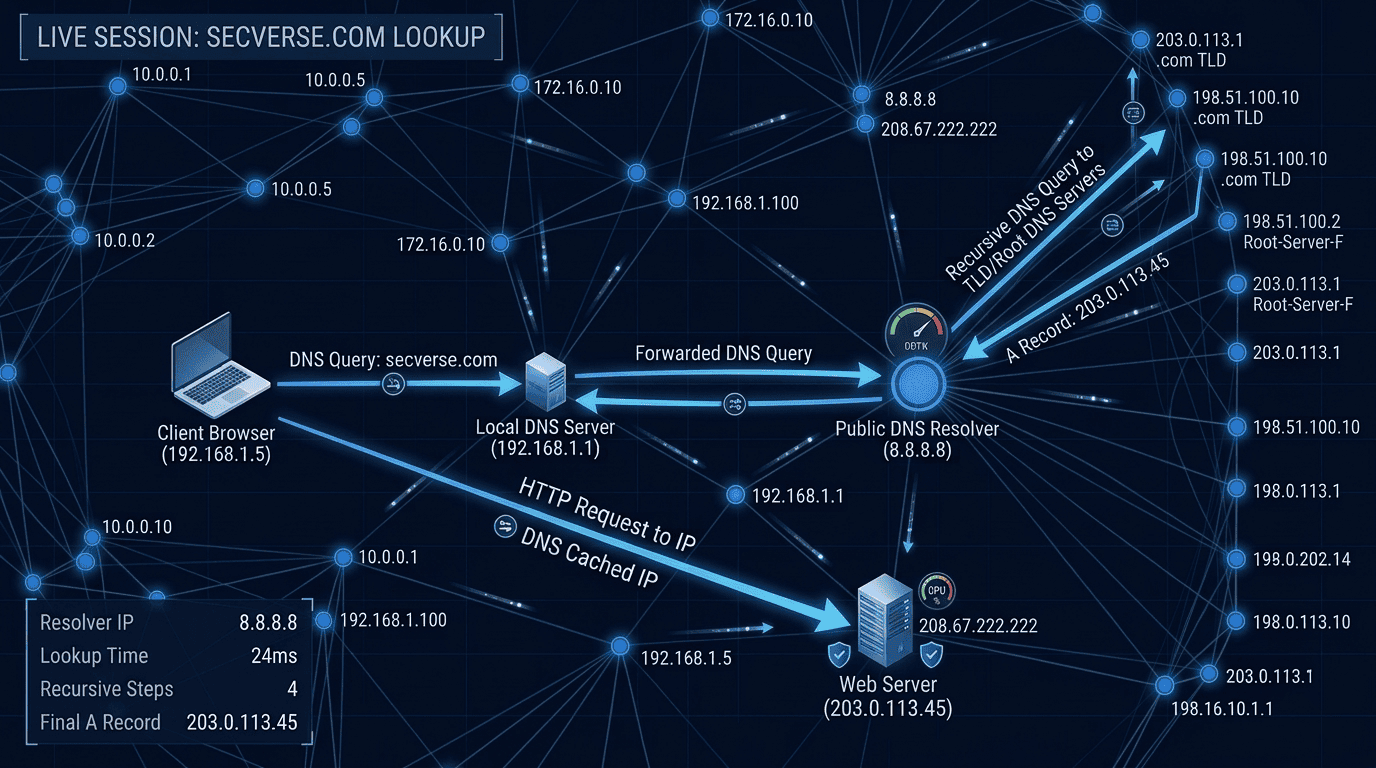
DNS (Domain Name System) translates human-readable domain names into IP addresses. When you type secverse.net, your computer does not know the IP. It asks a DNS server. That DNS server either knows the answer or asks other DNS servers until it finds it. The DNS resolution process is really just IP addressing in motion — a name becoming the address your device actually uses.
DNS Record Types — Every Security Professional Must Know These
DNS records extend IP addressing into names, mail routing, and verification — and reading them is a daily cybersecurity skill.
| Record Type | What It Does | Security Relevance |
|---|---|---|
|
A |
Maps a domain name to an IPv4 address |
Primary target of DNS reconnaissance. Shows the IP behind a domain. |
|
AAAA |
Maps a domain name to an IPv6 address |
IPv6 reconnaissance. Often overlooked in security assessments. |
|
MX |
Identifies the mail server for a domain |
Attackers target MX records to understand email infrastructure and attempt email spoofing. |
|
NS |
Identifies the authoritative nameservers for a domain |
NS records reveal the DNS provider. Zone transfer attacks target nameservers. |
|
CNAME |
Creates an alias pointing to another domain |
Subdomain takeover attacks exploit misconfigured CNAME records pointing to inactive services. |
|
TXT |
Stores text data (SPF, DKIM, DMARC, verification) |
Reveals email security posture. Missing SPF/DKIM/DMARC = email spoofing possible. |
|
PTR |
Reverse DNS — maps IP to domain name |
Reconnaissance. Shows what domain a given IP belongs to. |
|
SOA |
Start of Authority — administrative info about the zone |
Zone transfer attacks start here. |
DNS Attacks — How Attackers Abuse DNS
Because DNS sits so close to IP addressing, it is also a favorite target — cybersecurity teams watch these patterns closely.
| Attack | How It Works | Defense |
|---|---|---|
|
DNS Spoofing / Poisoning |
Inject false DNS records into a resolver’s cache. Client receives wrong IP and connects to attacker’s server instead of legitimate one. |
DNSSEC validation, encrypted DNS (DoH/DoT). |
|
DNS Zone Transfer |
Request a full copy of a DNS zone from a misconfigured nameserver. Reveals every subdomain and IP in the zone. |
Restrict zone transfers to authorized secondary DNS servers only. |
|
DNS Amplification DDoS |
Send small DNS queries with spoofed source IP (victim’s IP). DNS server sends large responses to victim. Amplifies attack traffic 50-100x. |
Rate limiting, BCP38 filtering, disable open recursion. |
|
Subdomain Takeover |
A CNAME record points to an external service that has been deprovisioned. Attacker registers the service and takes over the subdomain. |
Regular DNS audits. Remove DNS records for decommissioned services. |
|
DNS Tunneling |
Encode data inside DNS queries and responses to exfiltrate data or establish C2 channel through DNS (which is often not blocked by firewalls). |
DNS monitoring, anomaly detection, block uncommon DNS record types. |

My Experience — How DNS Saved and Cost Me Hours
Early in my career I was troubleshooting a connectivity issue — a real-world IP addressing problem — that had me stumped for most of a day. The system could reach some addresses but not others. The firewall rules looked correct. The routing table was fine.
I ran a DNS lookup on the addresses that were failing — basic IP addressing troubleshooting. The DNS was returning wrong IPs — leftover entries from a previous configuration that had not been cleaned up. The actual problem was not firewall, not routing. It was a stale DNS record pointing to a decommissioned server.
That experience is why I include DNS in every investigation I do, even when DNS does not seem to be the issue. It is the least obvious layer and often where the problem is hiding.
From an offensive perspective: DNS reconnaissance is often the most information-rich phase of a penetration test. Before I touch a single target system, I have already identified every subdomain, every mail server, every IP range, and often the email security posture of the organization — all from DNS records alone. Good IP addressing habits, built early, pay off on every engagement.
Recommended Resources
These resources go deeper on IP addressing and networking for cybersecurity than a single article can.
| Resource | Type | Best For | Link |
|---|---|---|---|
|
CompTIA Network+ Study Guide — Mike Meyers |
Book |
IP addressing and subnetting — thorough and exam-focused |
|
|
Cisco CCNA 200-301 Official Cert Guide |
Book |
Deep subnetting and IPv6 coverage |
|
|
The Practice of Network Security Monitoring — Richard Bejtlich |
Book |
DNS monitoring and network investigation techniques |
|
|
Cisco Packet Tracer |
Platform |
Practice subnetting and IP configuration in a free simulator |
|
|
SecVerse Cisco Learning Path |
Resource |
Full CCNA roadmap — covers subnetting, IPv6, and DNS in depth |
Final Thoughts on Networking for Cybersecurity
IP addressing is the language of networks. DNS is the translation layer that makes that language human-readable. Together, they determine how every device finds and communicates with every other device. Mastering IP addressing is one of the most practical cybersecurity skills you can build, because every other network topic rests on it.
Attackers read DNS records before touching a target. Defenders monitor DNS for signs of data exfiltration and command-and-control traffic. Incident responders trace attacks hop by hop through IP address logs.
Learn this material until it becomes instinct. You will use it every day.
What's Coming Next
IP addressing and DNS get data to the right place. But knowing the destination is only part of the story — the next question is how that data actually travels. TCP and UDP govern reliable and fast delivery. HTTP, HTTPS, FTP, and SSH are the protocols you will see in logs, in traffic captures, and in every penetration test you run.
The next article covers the protocols every security professional must recognize on sight — what they do, what port they run on, and why attackers and defenders both watch them closely.
“This article contains affiliate links. See our full disclaimer policy.”