

Affiliate Disclaimer: Some links in this article are affiliate links. This means if you click a link and make a purchase, SecVerse may earn a small commission — at no extra cost to you. We only recommend tools we genuinely believe in and that we consider useful for your cybersecurity learning journey. Our editorial opinions are never influenced by affiliate relationships.
Introduction :
In the last article, we built the study plan—the structure that turns motivation into actual skill. Now, it is time to put that structure to work on the first real technical foundation: networking for cybersecurity.
The first time I had to trace a network problem on a live system, I did not reach for a tool. I sat down and thought about the path. Where did the packet originate? What path would it take? At which point could something be going wrong? That kind of thinking—layer by layer, hop by hop—is what separates someone who can troubleshoot a network from someone who just runs commands until something works.
Mastering networking for cybersecurity is the non-negotiable foundation of defensive and offensive operations. It does not matter if it appears on certification exams; what matters is that every modern attack travels over a network architecture. Every piece of malicious malware communicates over a network infrastructure, and every defensive perimeter is built around understanding and controlling what crosses a network zone.
This is Part 1 of our dedicated series. We start at the absolute beginning: how data actually moves, and the two primary structural models that describe it.
Why Networking for Cybersecurity Is the Foundation of Everything
Think about what happens when an attacker compromises a target system. They gain entry through a live network connection. They communicate with their external command and control (C2) server over a network. They exfiltrate sensitive data over a network. They move laterally to other internal systems—entirely over the network.
Now think about the defensive side of engineering. Firewalls control what enters and leaves an enterprise network. IDS and IPS engines monitor network traffic for highly suspicious patterns. VPNs securely encrypt traffic so it cannot be read in transit. Every single defensive tool operates at one or more layers of the network stack, making networking for cybersecurity an absolute prerequisite for any security analyst.
You simply cannot understand advanced attacks or robust defenses if you do not understand the network they operate on. This is not optional secondary knowledge. It is the core foundation everything else stands on.
The OSI Model — The Core Framework Behind Every Attack and Defense

The OSI model (Open Systems Interconnection) was created to give network engineers a common language for describing where in the communication process an event happens. For those studying networking for cybersecurity, it acts as a map. It has 7 distinct layers. Every network event—every attack, every packet, every connection—can be described in terms of which layer it operates at.
| Layer | Name | What Happens Here | Cybersecurity Relevance | Example Protocols |
|---|---|---|---|---|
|
7 |
Application |
User-facing network services and applications. |
Most attacks target this layer: SQL injection, XSS, phishing, API abuse. |
HTTP, HTTPS, FTP, SMTP, DNS, SSH |
|
6 |
Presentation |
Data formatting, encryption, and compression. |
SSL/TLS encryption operates here. Certificate attacks happen here. |
SSL/TLS, JPEG, ASCII, Unicode |
|
5 |
Session |
Managing communication sessions between systems. |
Session hijacking attacks target this layer. |
NetBIOS, RPC, SQL sessions |
|
4 |
Transport |
End-to-end data delivery, error checking, flow control. |
Port scanning, SYN floods, firewall rules all operate at this layer. |
TCP, UDP |
|
3 |
Network |
Logical addressing and routing between networks. |
IP spoofing, routing attacks, ICMP-based attacks. |
IP, ICMP, OSPF, BGP |
|
2 |
Data Link |
Physical addressing on a local network segment. |
ARP poisoning, MAC spoofing, VLAN hopping. |
Ethernet, ARP, MAC, 802.11 (WiFi) |
|
1 |
Physical |
The actual physical transmission of bits. |
Cable tapping, signal interception, physical access attacks. |
Cables, fiber, radio waves, hubs |
When you hear a security professional say “Layer 3 attack” or “Layer 7 firewall,” they are referencing these exact layers. Deepening your knowledge of networking for cybersecurity means you can immediately understand what level of the network stack is involved in any active security incident.
TCP/IP — The Architecture That Actually Runs the Internet

While the OSI model is an incredible conceptual framework, the TCP/IP model is what the internet actually runs on. It condenses the structure into 4 layers instead of 7. When analyzing networking for cybersecurity, mapping these models together helps you bridge theoretical knowledge with real-world traffic analysis.
| TCP/IP Layer | OSI Equivalent | What It Handles | Key Protocols |
|---|---|---|---|
|
Application |
OSI Layers 5, 6, 7 |
Everything the user and application see: websites, email, file transfer, remote access. |
HTTP/S, FTP, SMTP, DNS, SSH, Telnet |
|
Transport |
OSI Layer 4 |
How data is split into segments, delivered reliably (TCP) or quickly (UDP), and reassembled. |
TCP, UDP |
|
Internet |
OSI Layer 3 |
Logical addressing and routing. Getting packets from source to destination across networks. |
IP (IPv4/IPv6), ICMP, ARP |
|
Network Access |
OSI Layers 1, 2 |
Physical transmission and local network delivery. How bits actually travel over cables or wireless. |
Ethernet, WiFi (802.11), MAC |
TCP vs UDP — The Two Workhorses
At the Transport layer, almost everything uses either TCP or UDP. Understanding the structural difference is critical because attackers exploit both protocols, and defenders must constantly monitor both channels.
| Feature | TCP (Transmission Control Protocol) | UDP (User Datagram Protocol) |
|---|---|---|
|
Connection |
Connection-oriented. Establishes a session with a 3-way handshake (SYN, SYN-ACK, ACK). |
Connectionless. Sends data without establishing a session first. |
|
Reliability |
Reliable. Guarantees delivery. Retransmits lost packets. |
Unreliable. No guarantee of delivery. No retransmission. |
|
Speed |
Slower due to overhead of error checking and acknowledgment. |
Faster due to no overhead. |
|
Use Cases |
Web browsing (HTTP/S), email (SMTP), file transfer (FTP), SSH. |
DNS queries, video streaming, VoIP, online gaming. |
|
Attack Surface |
SYN flood attacks exploit the 3-way handshake. TCP session hijacking targets established sessions. |
UDP flood attacks. DNS amplification attacks use UDP. |
How a Packet Travels End-to-End
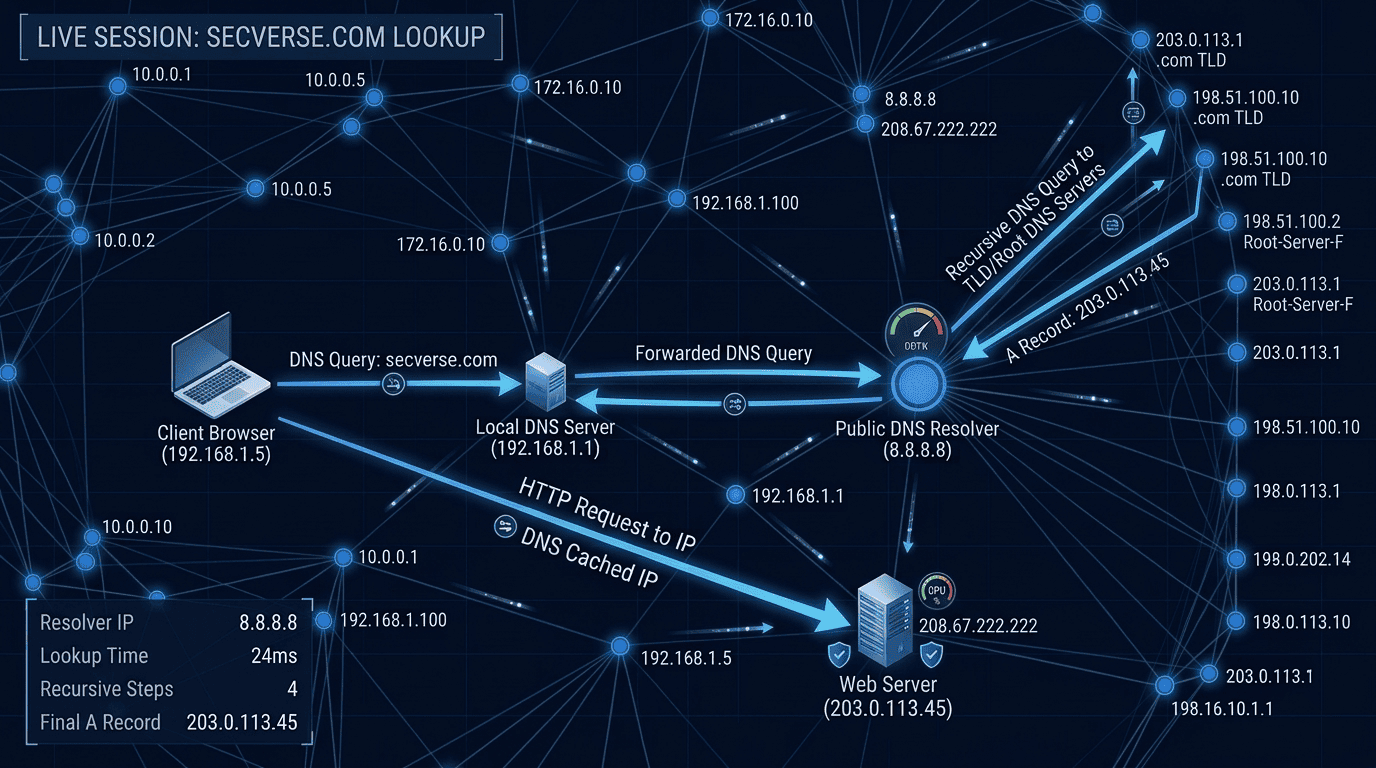
Here is what happens when you type secverse.net into your browser address bar and press Enter. This is the complete journey of a single data packet, analyzed through the lens of networking for cybersecurity:
| Step | What Happens | Layer | Protocol |
|---|---|---|---|
|
1 |
Your browser creates an HTTP GET request for secverse.net |
Application (L7) |
HTTP |
|
2 |
DNS resolves secverse.net to its IP address (198.54.117.210) |
Application (L7) |
DNS over UDP |
|
3 |
TCP 3-way handshake establishes connection to the server |
Transport (L4) |
TCP SYN/SYN-ACK/ACK |
|
4 |
Your OS encapsulates the HTTP request in a TCP segment |
Transport (L4) |
TCP |
|
5 |
The segment is wrapped in an IP packet with source and destination IP |
Network/Internet (L3) |
IP |
|
6 |
The IP packet is wrapped in an Ethernet frame for the local network |
Data Link (L2) |
Ethernet/MAC |
|
7 |
The frame is converted to electrical/optical/radio signals and transmitted |
Physical (L1) |
Physical medium |
|
8 |
Each router along the path unwraps to Layer 3, makes routing decision, re-wraps |
Network (L3) |
IP routing |
|
9 |
The destination server receives, unwraps each layer, delivers to web server |
All layers |
Full stack |
Every modern cyberattack intercepts, manipulates, or impersonates data at one or more of these distinct steps. For example, ARP poisoning directly attacks Step 6. IP spoofing manipulations target Step 5. Man-in-the-middle operations intercept Steps 5-7, while application-layer exploits target Steps 1-3.

What Attackers Look for at Each Layer
When evaluating networking for cybersecurity, you must learn to view the network stack through the eyes of an adversary.
| Step | What Attackers Target | Attack Name | What It Does |
|---|---|---|---|
|
Application (L7) |
Web apps, APIs, input fields |
SQL Injection, XSS, CSRF |
Exploit trust in user input to gain unauthorized access or data |
|
Presentation (L6) |
SSL/TLS implementation |
SSL Stripping, Certificate Spoofing |
Downgrade or intercept encrypted communications |
|
Session (L5) |
Authenticated sessions |
Session Hijacking, Cookie Theft |
Steal or forge session tokens to impersonate authenticated users |
|
Transport (L4) |
Open ports, TCP handshake |
SYN Flood, Port Scanning |
Exhaust resources or map the attack surface |
|
Network (L3) |
IP addresses, routing |
IP Spoofing, ICMP Flood |
Fake source addresses or overwhelm with ICMP packets |
|
Data Link (L2) |
ARP cache, MAC addresses |
ARP Poisoning, MAC Spoofing |
Redirect local traffic or bypass MAC-based controls |
|
Physical (L1) |
Physical access to cabling |
Cable Tap, Signal Interception |
Physically intercept data in transit |
My Experience — Why I Learned Networking Before Everything Else
When I started working in IT infrastructure—installing physical systems, running cables, and configuring hardware switches and routers—I had no formal cybersecurity goals yet. I was simply building infrastructure. But that core work gave me an asset most security professionals have to work hard to acquire later: a native instinct for how networks behave.
When I later transitioned into security operations, I could look at raw network traffic patterns and immediately know what was normal and what was anomalous. This wasn’t because I memorized massive threat signatures, but because I understood networking for cybersecurity from a fundamental, practical level.
The professionals I have seen struggle the most are the ones who learned complex security automation tools without first learning what normal traffic looks like. They can easily run Nmap or execute Wireshark captures, but they cannot tell you why a specific structural pattern of traffic should concern them. Learn the foundation first. It is the part that makes everything else make sense.
Recommended Resources
| Resource | Type | Best For | Link |
|---|---|---|---|
|
Computer Networks — Andrew Tanenbaum |
Book |
The definitive networking textbook. Deep technical understanding. |
|
|
CompTIA Network+ Study Guide — Mike Meyers |
Book |
Certification-focused networking foundation. Practical and thorough. |
|
|
Cisco CCNA 200-301 Official Cert Guide |
Book |
Cisco-specific networking — the most respected CCNA prep book. |
|
|
Cisco Packet Tracer |
Platform |
Free network simulator — build and test networks without hardware. |
|
|
Wireshark |
Platform |
Free packet analyzer — see real network traffic layer by layer. |
|
|
SecVerse Learning Paths Hub |
Resource |
Full Cisco certification roadmap and resources. |
Final Thoughts on Networking for Cybersecurity
The OSI model and TCP/IP protocols are not abstract concepts confined to textbooks and entry-level exam questions. They comprise the active architecture of every corporate network you will ever analyze, attack, or defend.
When you master networking for cybersecurity, you stop being someone who blindly runs automated tools and start being an engineer who truly understands what those tools are executing under the hood. Build this technical understanding deliberately.
What's Coming Next
TCP/IP and the OSI model explain how data is structured for its journey. The next article in our networking for cybersecurity series picks up exactly where this one ends: IP addressing, subnetting, and DNS. We will explore how every device gets a unique address, how networks are divided into manageable zones, and how a domain name like secverse.net becomes an address a computer can actually route.
“This article contains affiliate links. See our full disclaimer policy.”