ARMO CTRL

Home > Resources > Virtual Labs > ARMO CTRL
Kubernetes Container Escapes, Namespace Traversal, RBAC Abuse, and Cloud Metadata SSRF
ARMO CTRL — Practice Attacking the Infrastructure That Powers Modern Applications

What is ARMO CTRL?

ARMO CTRL is a free, hands-on attack simulation platform specifically built for Kubernetes and cloud-native security. While most security practice platforms focus on traditional network and web environments, ARMO CTRL targets the infrastructure layer that most modern applications actually run on: containers, Kubernetes clusters, and cloud platforms. ARMO is the company behind Kubescape — the most widely used open-source Kubernetes security scanner — and CTRL extends that expertise into practical attack simulation covering container escapes, privilege escalation within pods, lateral movement between namespaces, and cloud metadata service abuse.

Is This Right for You?

This is for you if...

  • You work with Kubernetes clusters and want to understand how they get attacked
  • You’re a DevSecOps or cloud security engineer needing hands-on attack simulation
  • You want free cloud-native security practice without setting up a full Kubernetes lab yourself
  • You’re expanding from traditional security into cloud-native and container security
  • You want to learn Kubernetes misconfigurations from an attacker’s perspective

This is NOT for you if...

  • You’re new to security — you need Linux, networking, and basic security fundamentals first
  • You’re focused on traditional network or web security — ARMO CTRL is exclusively cloud-native
  • You want broad offensive training — this is a specialist platform

Platform Features

Feature Details
Kubernetes Attack Simulations
Practice real attacks against live Kubernetes environments in your browser
Misconfiguration Detection
Identify and exploit common Kubernetes security misconfigurations
Cloud Provider Scenarios
AWS, GCP, and Azure-specific attack scenarios
MITRE ATT&CK Alignment
All scenarios mapped to cloud ATT&CK for Containers framework
Free Tier Access
Generous free access — no credit card required to start
Educational Content
Built-in explanations of why each attack works and how to prevent it
Kubescape Integration
Connects to ARMO’s scanner for combined attack/defense perspective
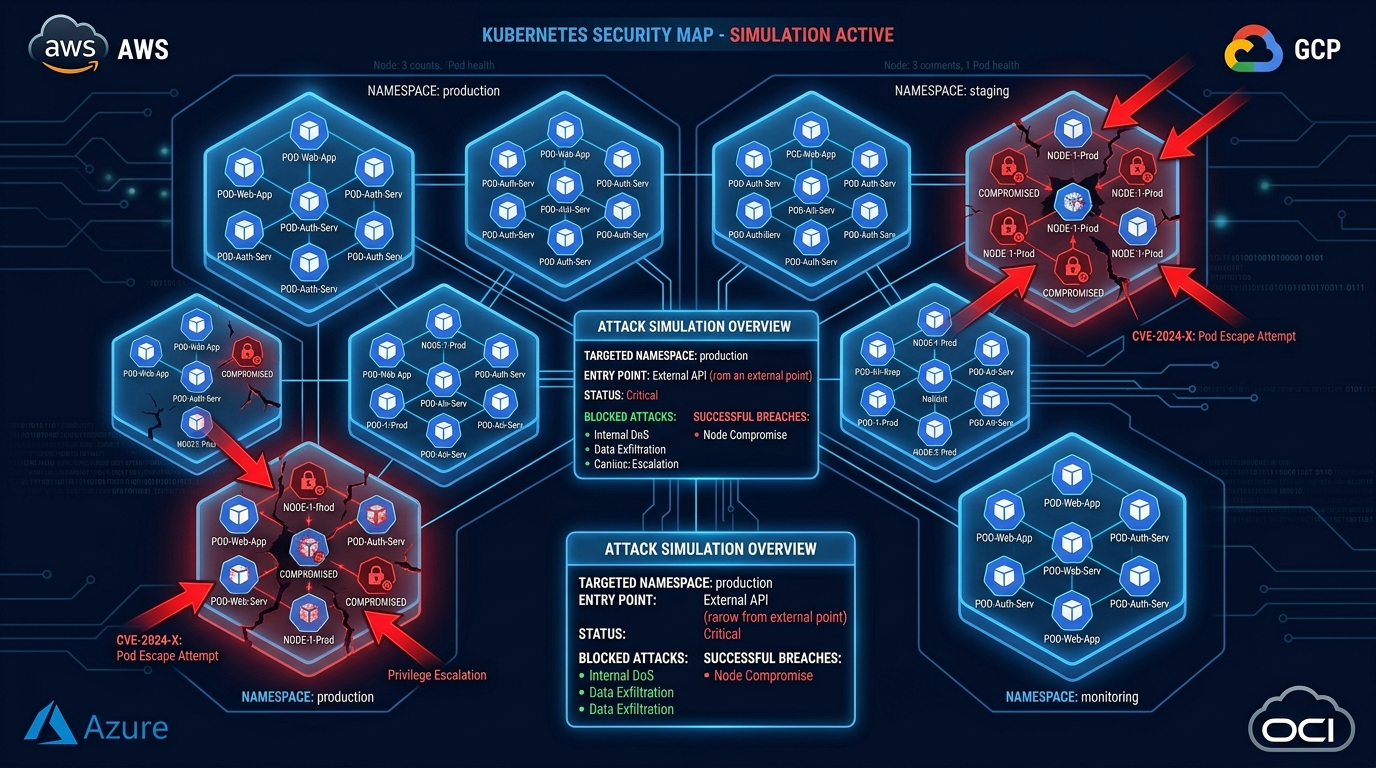
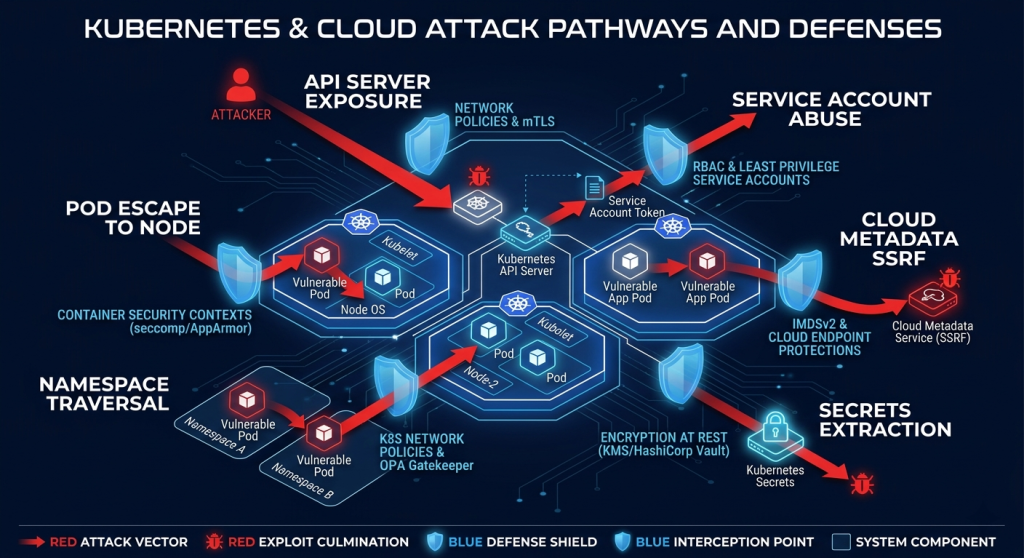
API Server Exposure, Pod Escape, Namespace Traversal, Service Account Abuse, Cloud Metadata, Secrets Extraction
Kubernetes Attack Surface Map

Pricing

Tier Price Includes
Free
$0
Full access to basic attack simulations and educational content
Premium / Enterprise
Contact ARMO
Advanced scenarios, team features, enterprise Kubescape integration
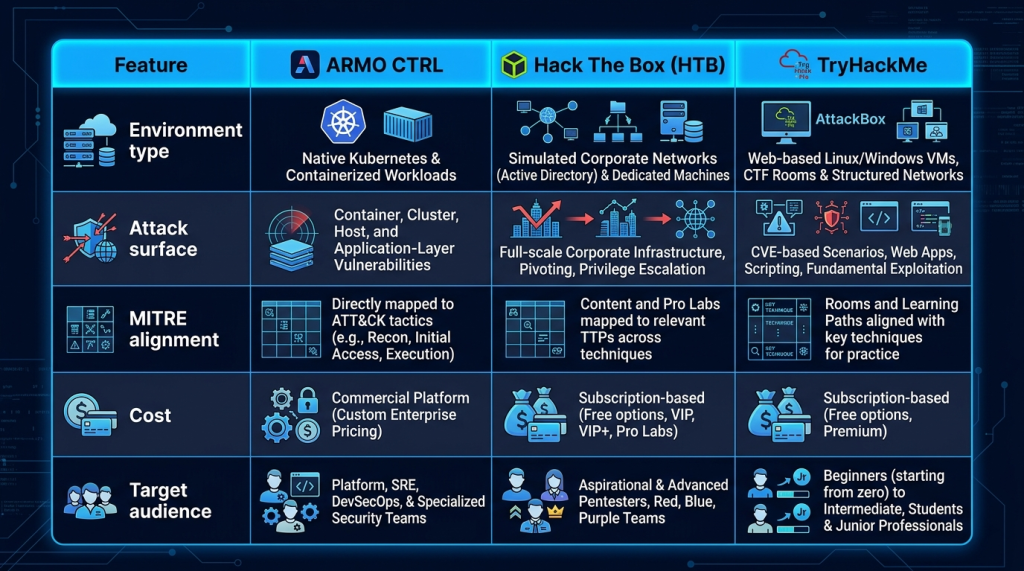
Cloud-Native Container Attacks (ARMO CTRL) vs Traditional VM-Based Exploitation (HTB/THM)
ARMO CTRL vs Traditional Security Labs

Kubernetes Attack Techniques Covered

Container and Pod Attacks

Practice breaking out of misconfigured containers, exploiting privileged pod configurations, and escalating from container-level to node-level access. These mirror real Kubernetes compromises documented by cloud security researchers.

Cluster Lateral Movement

Once inside a cluster, attackers pivot between namespaces, abuse service accounts with excessive RBAC permissions, and move laterally to higher-value pods or secrets. ARMO CTRL simulates these movement techniques in live environments.

Cloud Metadata Abuse

Cloud instances running Kubernetes nodes expose metadata APIs (AWS: 169.254.169.254, GCP: metadata.google.internal). From a compromised pod, attackers query these endpoints to extract IAM credentials and pivot to cloud management planes. ARMO CTRL covers this critical attack path.

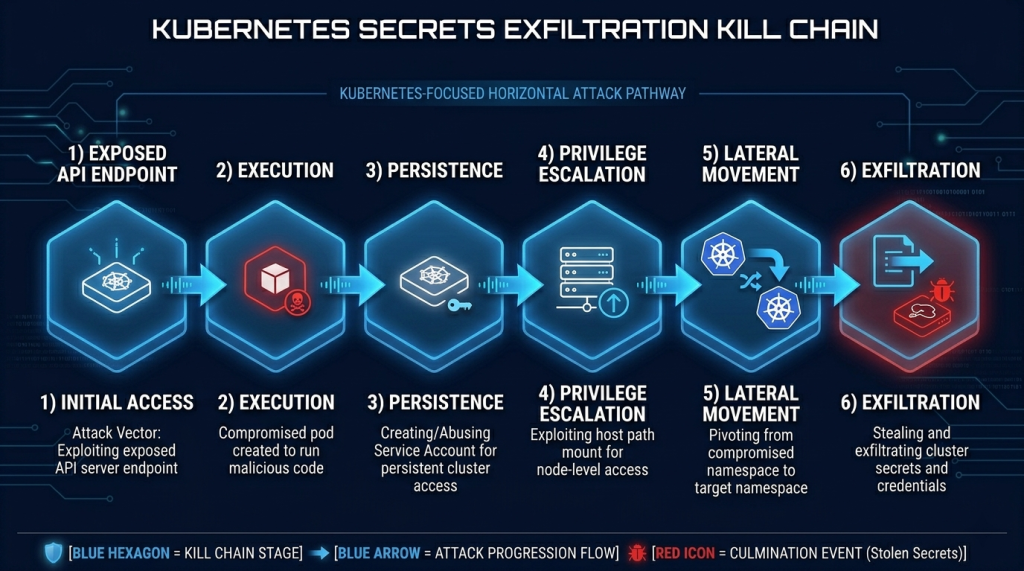
Initial Access → Execution → Persistence → Privilege Escalation → Lateral Movement → Credential Exfiltration
Kubernetes Attack Kill Chain

Certification Prep — What ARMO CTRL Helps With

Certification / Path How ARMO CTRL Helps
KCSA (Kubernetes and Cloud Security Associate)
Direct preparation — Kubernetes attack and defense scenarios
CKS (Certified Kubernetes Security Specialist)
Attacker perspective that complements CKS defensive focus
GCPN (GIAC Cloud Penetration Tester)
Cloud-native attack techniques across AWS/GCP/Azure
DevSecOps roles
Practical attack simulation that informs CI/CD security controls
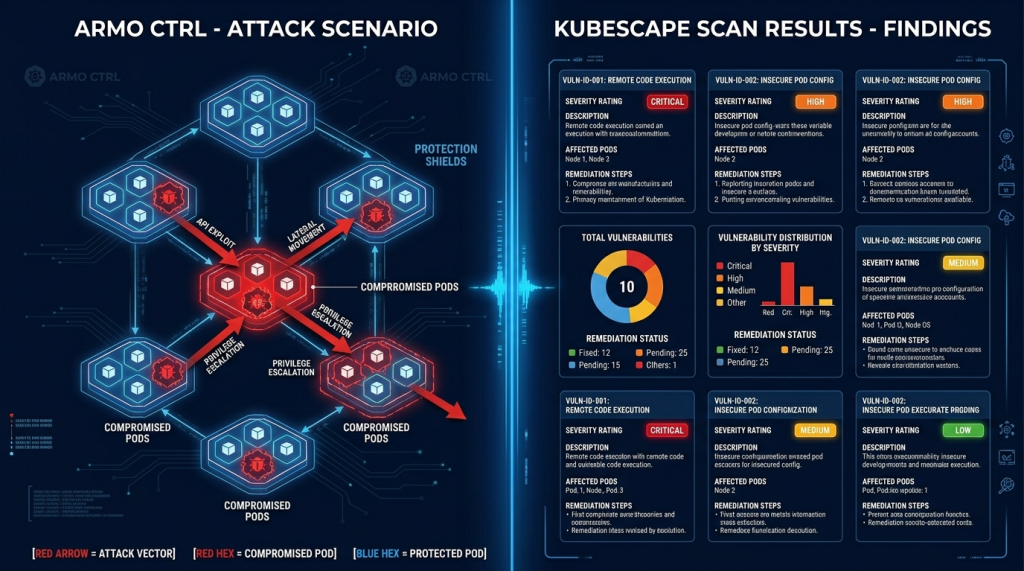
Attack Simulation + Kubescape Defensive Scanning — Understanding Kubernetes Security from Both Sides
ARMO CTRL Combined Attack and Defense View

Recommended Resources

Official Study Guides

── SecVerse Marketplace — Resources ──

Which Platform is Right for You?

ARMO CTRL is the right choice when Kubernetes and cloud-native security is your focus. Here is how it compares:

If you want... Best Choice
You want broad offensive security practice across network, AD, and web
Hack The Box — the widest range of machine types
You want beginner-friendly guided defensive paths
TryHackMe — structured SOC and cloud paths
You want advanced AI-adaptive attack scenarios
CyberWargames AI — adaptive multi-domain scenarios
You want free hands-on Kubernetes and cloud attack simulation
ARMO CTRL — this is the right choice

How to Get Started

  1. Get Kubernetes basics before CTRL. If you can’t explain what a pod, namespace, service account, and RBAC role are — spend a week on kubernetes.io/docs first. ARMO CTRL assumes you understand what you’re attacking.
  2. Install Kubescape on any Kubernetes cluster you have access to. Run a scan against a test cluster (Kind or Minikube locally). Read the findings. Understanding what misconfigurations look like from a defensive scanner makes the attack simulations more meaningful.
  3. Work through CTRL scenarios in order of complexity. ARMO CTRL’s built-in educational content explains why each attack works. Read it — understand the misconfiguration that enabled each technique.

📌 Note: The information on this page — including certification details, exam codes, pricing, and salary ranges — is regularly reviewed and updated to reflect the latest data from official sources. Always verify current details directly with the relevant certification body or platform before making any decisions.

Community & Support

Related Articles

The 6 Learning Paths Every Cybersecurity Beginner Should Know

Affiliate Disclaimer: Some links in this article are affiliate links. This means if you click a link and make a purchase, SecVerse may earn a small commission — at no extra cost to you. We only recommend tools we genuinely believe in and that we consider useful for your cybersecurity learning journey. Our editorial opinions are never influenced by affiliate relationships. Introduction: **In our first guide**, we covered how to start learning cybersecurity without feeling overwhelmed. If you haven’t read it yet, start there. Now, let’s talk about which path to take once you’re ready. When I decided to get into cybersecurity 20 years ago after I graduated from school of engineering as computer engineer, I had no idea which path to take. I bought a CEH course first. Then I bought a Security+ book. Then I tried to learn networking. I was all over the place. Don’t be me.

Read More »

How to Start Learning Cybersecurity Without Feeling Overwhelmed

Affiliate Disclaimer: Some links in this article are affiliate links. This means if you click a link and make a purchase, SecVerse may earn a small commission — at no extra cost to you. We only recommend tools we genuinely believe in and that we consider useful for your cybersecurity learning journey. Our editorial opinions are never influenced by affiliate relationships. Introduction: The Overwhelm is Real (But Avoidable) Let’s be honest with ourselves to avoid the shock and be realistic. Cyber security is huge, branching, and massive field. When I decided to get and start in this field 20 years ago. I made every mistake imaginable: Bought expensive courses I never finished. Tried to learn everything at once – pentesting, malware analysis, cloud security, forensics. All in short time. Got trapped in “tutorial”- watching videos for hours but never actually doing anything because of not practicing them and being confused.
Read More »