What is Huawei eNSP?
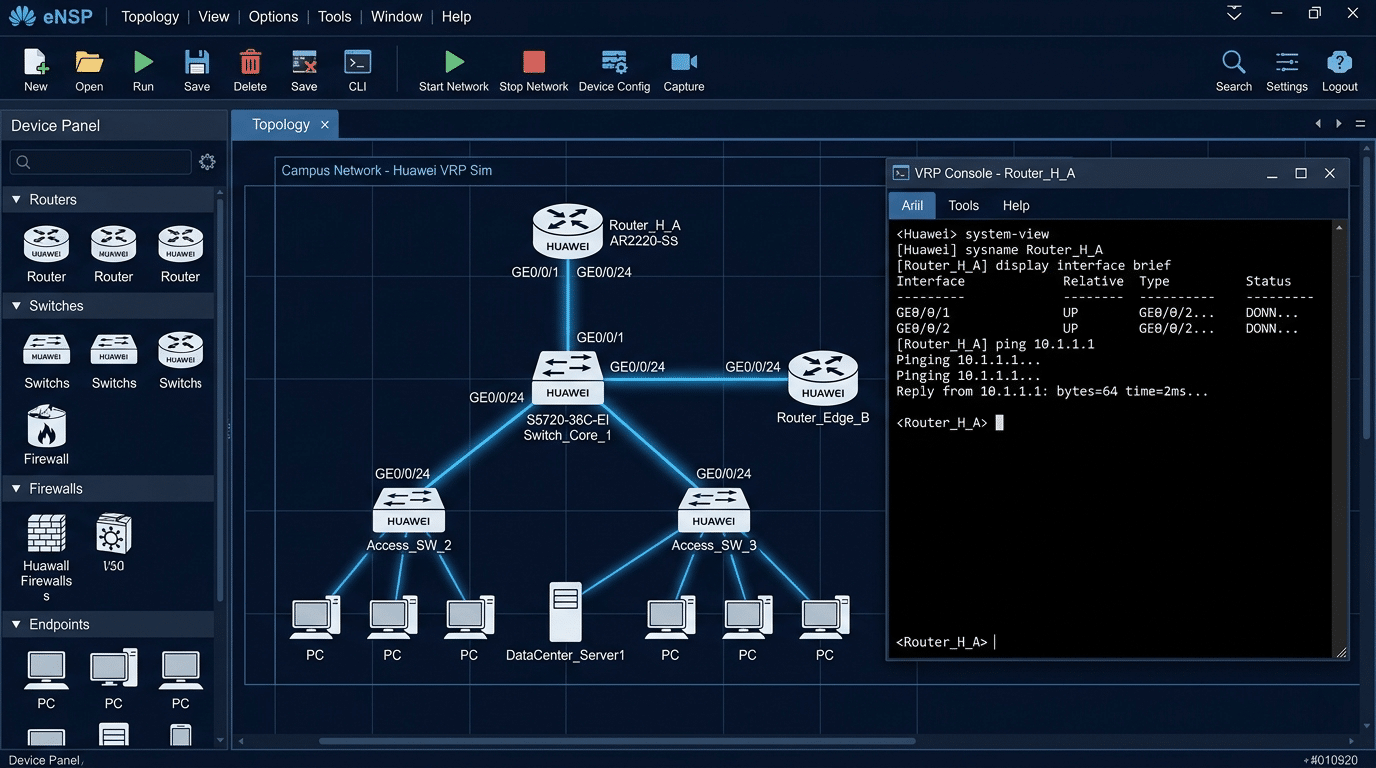
Huawei eNSP (Enterprise Network Simulation Platform) is Huawei’s official free network simulation software. It runs real VRP (Versatile Routing Platform) — the same operating system that powers Huawei’s physical routers, switches, and firewalls in enterprise and carrier networks. Unlike general-purpose simulators, eNSP is purpose-built for Huawei certification candidates and network engineers who need to practice on authentic Huawei command syntax and device behavior.
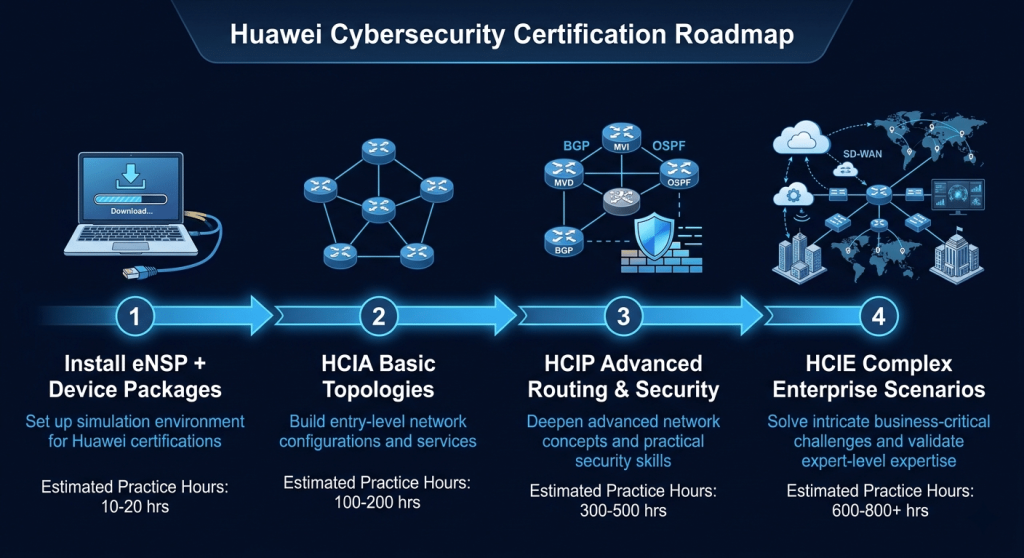
For anyone studying toward HCIA, HCIP, or HCIE certifications, eNSP is the standard practice environment. Every official Huawei training course and certification lab guide references it directly. If Cisco Packet Tracer is the tool for CCNA candidates, eNSP is its equivalent for the Huawei certification track.
Is This Right for You?
This is for you if...
- You are studying for HCIA, HCIP, or HCIE Security, Routing & Switching, or Datacom certifications
- You want to practice real Huawei VRP commands without buying physical hardware
- You work in environments running Huawei network infrastructure — Asia, Middle East, Africa, or Europe
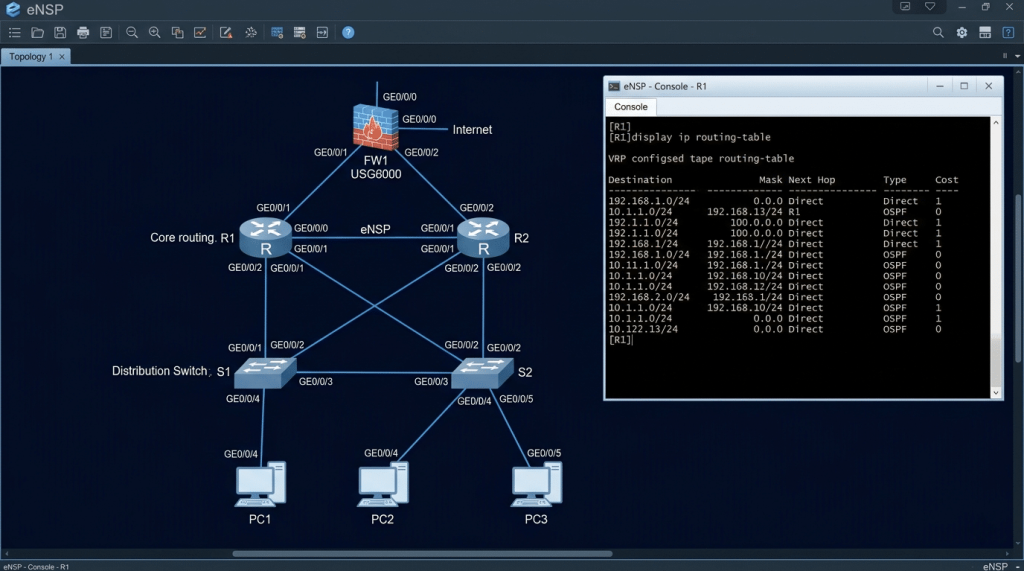
- You want to simulate complete Huawei enterprise topologies including routers, switches, and USG firewalls
- You are transitioning from Cisco to Huawei environments and need hands-on VRP practice
This is NOT for you if...
- You are studying Cisco, Fortinet, or MikroTik certifications — eNSP only simulates Huawei devices
- You are on macOS or Linux — eNSP officially supports Windows only
- You need the most current Huawei firmware — eNSP development slowed after 2023, though it remains fully functional for exam preparation
Platform Overview
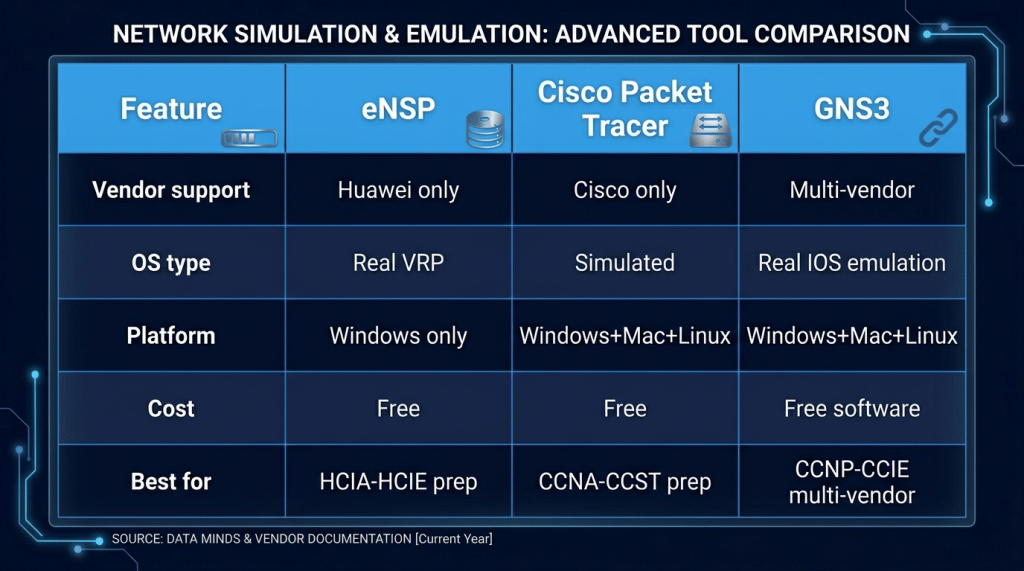
| Feature | Details |
|---|---|
|
Supported devices |
AR series routers, S series switches, USG series firewalls, WLAN access points, firewalls |
|
Operating system |
Real VRP (Versatile Routing Platform) — same OS as physical Huawei hardware |
|
Platform support |
Windows 7/10/11 (official). Not supported on macOS or Linux natively. |
|
Cost |
Completely free — download from Huawei’s official website with a free account |
|
Integration |
Can be integrated with Wireshark for packet capture on simulated links |
|
Lab files |
Official Huawei training courses provide downloadable eNSP topology files |
|
Community |
Active community on Huawei Learning Network and regional forums |
Devices You Can Simulate
| Device Category | Models Available | Certification Relevance |
|---|---|---|
|
Routers |
AR1220, AR2220, AR3260 — enterprise access and branch routers |
HCIA/HCIP Datacom, Routing & Switching |
|
Switches |
S3700, S5700, S6700 — Layer 2 and Layer 3 switching |
HCIA/HCIP Datacom |
|
Firewalls |
USG6000 series — Huawei’s enterprise NGFW platform |
HCIA/HCIP/HCIE Security |
|
WLAN |
AP6050DN and AC6605 — wireless LAN controller and access points |
HCIA/HCIP WLAN |
|
Servers |
Generic PC and server nodes for end-to-end topology testing |
All tracks |
Key Topics You Can Practice in eNSP
Routing Protocols
Configure and troubleshoot OSPF, BGP, IS-IS, RIP, and static routing on AR series routers. eNSP’s VRP implementation behaves identically to physical hardware — making it reliable preparation for HCIA and HCIP written and lab exams.
Switching and VLANs
Configure VLANs, trunking, Spanning Tree Protocol (STP/RSTP/MSTP), VRRP, and inter-VLAN routing on S series switches. The command syntax matches exactly what HCIA Datacom exam questions test.
Security and Firewall Configuration
Configure USG6000 security policies, NAT, VPN (IPSec and SSL), intrusion prevention, and application control. For HCIP and HCIE Security candidates, USG firewall practice in eNSP is essential — these are the exact commands tested in the lab exam.
Network Management
Practice SNMP configuration, syslog setup, NTP synchronization, and SSH/Telnet management access. Huawei’s iMaster NCE network management system integrates with eNSP for advanced network automation practice.
Setting Up eNSP
| Requirement | Specification |
|---|---|
|
Operating system |
Windows 7, Windows 10, or Windows 11 (64-bit recommended) |
|
RAM |
Minimum 4GB — 8GB recommended for running multiple devices simultaneously |
|
CPU |
Dual-core minimum — quad-core recommended for complex topologies |
|
Disk space |
3GB for eNSP + additional space for device packages |
|
Dependencies |
VirtualBox (bundled with eNSP installer), WinPcap for Wireshark integration |
|
Network adapter |
Virtual network adapter required — installed automatically by eNSP |
eNSP vs Physical Huawei Hardware
For HCIA and HCIP certification preparation, eNSP covers everything you need. The VRP command syntax, routing protocol behavior, and firewall policy configuration are identical to physical hardware. The main limitations are performance (eNSP runs slower than real hardware) and some advanced features that require physical hardware for full testing. For HCIE lab exam preparation specifically, supplementing eNSP with access to physical equipment or Huawei’s official lab environments is recommended.
Pricing
| Option | Cost | Notes |
|---|---|---|
|
eNSP software |
Free |
Download from Huawei’s official site — requires free Huawei account registration |
|
Device packages |
Free |
Additional device packages (firewalls, WLAN) downloadable from Huawei Learning Network |
|
Huawei Learning Network |
Free (basic) |
Official community, lab guides, and topology files for all certification tracks |
|
Official Huawei training courses |
Paid — varies by region |
Instructor-led courses include eNSP lab files and guided exercises |
Certification Prep — What eNSP Helps With
| Certification | How eNSP Helps | Key Practice Areas |
|---|---|---|
|
HCIA Datacom |
Primary practice environment — all official lab exercises use eNSP |
Routing, switching, VLANs, basic security |
|
HCIP Datacom |
Advanced topology simulation for written and lab exam preparation |
OSPF, BGP, MPLS, advanced switching |
|
HCIA Security |
USG firewall basic configuration practice |
Firewall policies, NAT, basic VPN |
|
HCIP Security |
Advanced USG configuration — directly tested in HCIP lab exam |
IPSec VPN, SSL VPN, intrusion prevention, application control |
|
HCIE Security |
Complex multi-device security topologies |
Full enterprise security architecture, advanced threat defense |
Recommended Resources
- Huawei Learning Network — official community, free lab guides, eNSP topology files for every certification track
- eNSP download — official download page, device packages, and installation guide
- Huawei Talent Online — official free HCIA and HCIP training courses with integrated eNSP lab exercises
- Huawei iLearningX — instructor-led certification courses that use eNSP as the official lab environment
── SecVerse Marketplace — Huawei Resources ──
Which Platform is Right for You?
GNS3 is the right choice when you need real network operating system behavior for advanced certification prep. Here is how it compares:
| If you want... | Best Choice |
|---|---|
|
Practice for HCIA, HCIP, or HCIE — any track |
eNSP — this is the right choice |
|
Official Cisco simulation for CCNA/CCST |
Cisco Packet Tracer — official and free |
|
Multi-vendor simulation with real IOS |
GNS3 — supports Cisco, Fortinet, MikroTik, and Huawei together |
|
Hands-on security lab practice beyond networking |
Hack The Box or TryHackMe |
|
Huawei + Cisco + Fortinet in one topology |
GNS3 — run eNSP devices alongside other vendors |
How to Get Started
- Download and install eNSP from Huawei’s official support portal. You need a free Huawei account to download. Go to support.huawei.com, search for eNSP, download the latest version. The installer includes VirtualBox — do not install a separate VirtualBox version as it may conflict.
- Download the device packages for your certification track. After installing eNSP, open it and go to Tools → Device Package Manager. Download the AR router, S switch, and USG firewall packages relevant to your exam. Without the packages the devices won’t start.
- Start with the official HCIA lab topology files. Huawei Learning Network provides free downloadable eNSP topology files for every HCIA module. Download the HCIA Datacom or HCIA Security starter pack, open the topology in eNSP, and follow the lab guide. This is faster than building topologies from scratch on day one.
📌 Note: The information on this page — including certification details, exam codes, pricing, and salary ranges — is regularly reviewed and updated to reflect the latest data from official sources. Always verify current details directly with the relevant certification body or platform before making any decisions.
Community & Support
── Huawei eNSP Communities ──
Related Articles
The 6 Learning Paths Every Cybersecurity Beginner Should Know
Affiliate Disclaimer: Some links in this article are affiliate links. This means if you click a link and make a purchase, SecVerse may earn a small commission — at no extra cost to you. We only recommend tools we genuinely believe in and that we consider useful for your cybersecurity learning journey. Our editorial opinions are never influenced by affiliate relationships. Introduction: **In our first guide**, we covered how to start learning cybersecurity without feeling overwhelmed. If you haven’t read it yet, start there. Now, let’s talk about which path to take once you’re ready. When I decided to get into cybersecurity 20 years ago after I graduated from school of engineering as computer engineer, I had no idea which path to take. I bought a CEH course first. Then I bought a Security+ book. Then I tried to learn networking. I was all over the place. Don’t be me.
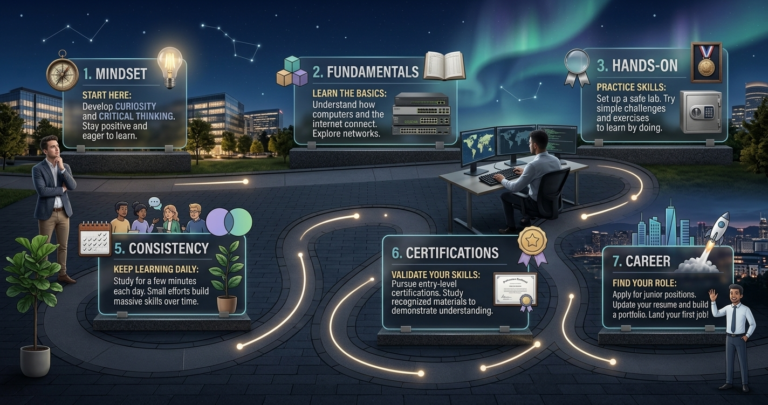
How to Start Learning Cybersecurity Without Feeling Overwhelmed
Affiliate Disclaimer: Some links in this article are affiliate links. This means if you click a link and make a purchase, SecVerse may earn a small commission — at no extra cost to you. We only recommend tools we genuinely believe in and that we consider useful for your cybersecurity learning journey. Our editorial opinions are never influenced by affiliate relationships. Introduction: The Overwhelm is Real (But Avoidable) Let’s be honest with ourselves to avoid the shock and be realistic. Cyber security is huge, branching, and massive field. When I decided to get and start in this field 20 years ago. I made every mistake imaginable: Bought expensive courses I never finished. Tried to learn everything at once – pentesting, malware analysis, cloud security, forensics. All in short time. Got trapped in “tutorial”- watching videos for hours but never actually doing anything because of not practicing them and being confused.