What is GNS3?
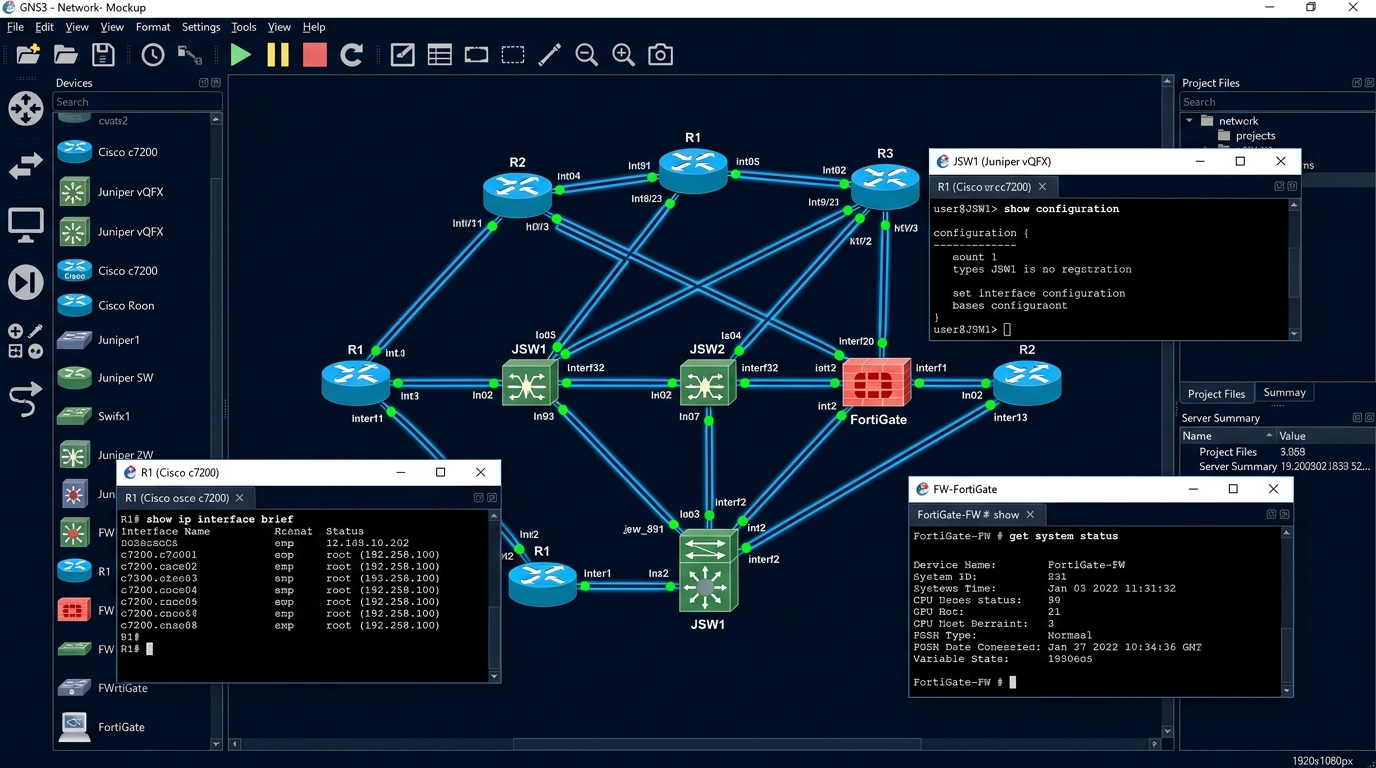
GNS3 (Graphical Network Simulator-3) is a free, open-source network simulation platform that runs real network operating system images — actual Cisco IOS, Juniper JunOS, Fortinet FortiOS, MikroTik RouterOS, and more — inside a virtualized environment. Unlike Cisco Packet Tracer which simulates device behavior, GNS3 emulates real hardware by running the actual firmware. What you configure in GNS3 behaves exactly as it would on physical equipment.
For security professionals, GNS3 is the bridge between learning network concepts and working in production environments. CCNP and CCIE candidates use it to build complex multi-vendor topologies. Penetration testers use it to simulate target networks. Security researchers use it to test attack scenarios against real network operating systems.
Is This Right for You?
This is for you if...
- You’re studying for CCNP, CCIE, or any advanced networking certification that requires real IOS
- You want to simulate multi-vendor environments — Cisco, Juniper, Fortinet, MikroTik, Arista simultaneously
- You’re a security professional who needs to test network attack techniques against real device behavior
- You’ve outgrown Cisco Packet Tracer and need more realistic simulation
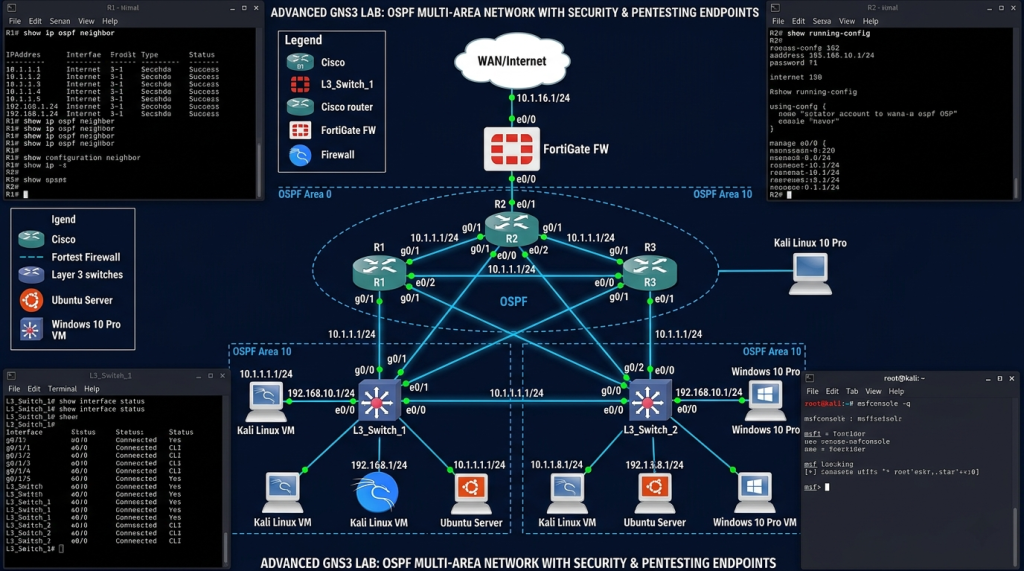
- You want to build complex security lab topologies with real firewall, IDS, and routing behavior
This is NOT for you if...
- You’re a complete beginner — start with Cisco Packet Tracer first, it’s far more accessible
- You don’t have a reasonably powerful machine — GNS3 running real IOS images is resource-intensive
- You need a quick lab for basic CCNA concepts — Packet Tracer is faster and simpler for that
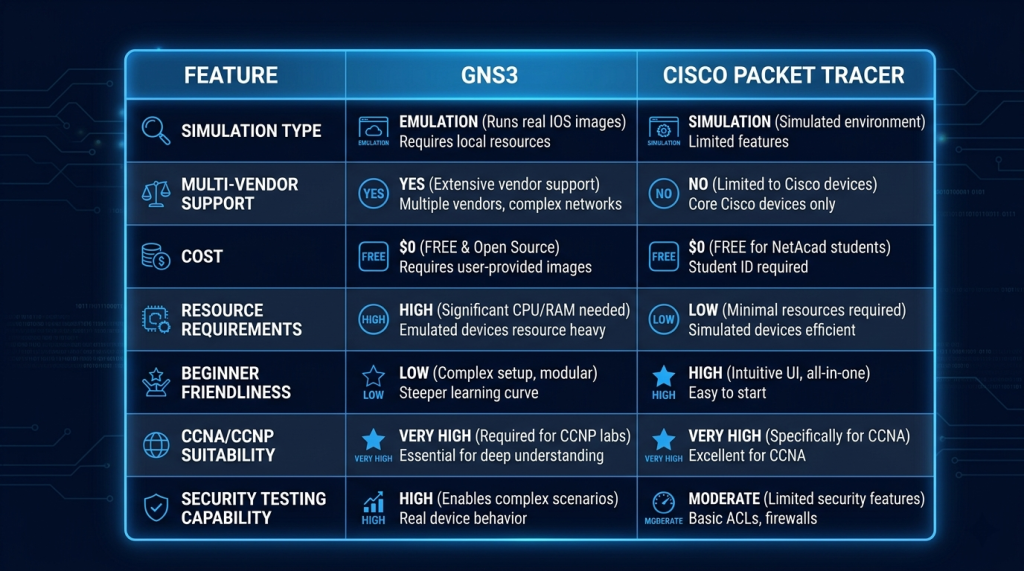
GNS3 vs Cisco Packet Tracer
| Feature | GNS3 | Cisco Packet Tracer |
|---|---|---|
|
Simulation type |
Real OS emulation — actual IOS/JunOS/FortiOS images |
Simulated behavior — not real firmware |
|
Multi-vendor support |
Yes — Cisco, Juniper, Fortinet, MikroTik, Arista, and more |
Cisco only |
|
Cost |
Free (software) — IOS images require licenses |
Free — with NetAcad account |
|
Resource requirements |
High — real OS images need significant RAM and CPU |
Low — runs on modest hardware |
|
Beginner friendliness |
Steep learning curve — complex setup |
Simple — designed for beginners |
|
CCNA suitability |
Yes — but Packet Tracer is often easier for CCNA |
Yes — official CCNA lab tool |
|
CCNP/CCIE suitability |
Excellent — real IOS behavior, complex topologies |
Limited — insufficient for CCNP+ |
|
Security testing |
Excellent — real firewall and routing behavior |
Limited simulation only |
Security Use Cases in GNS3
Network Security Assessment Lab
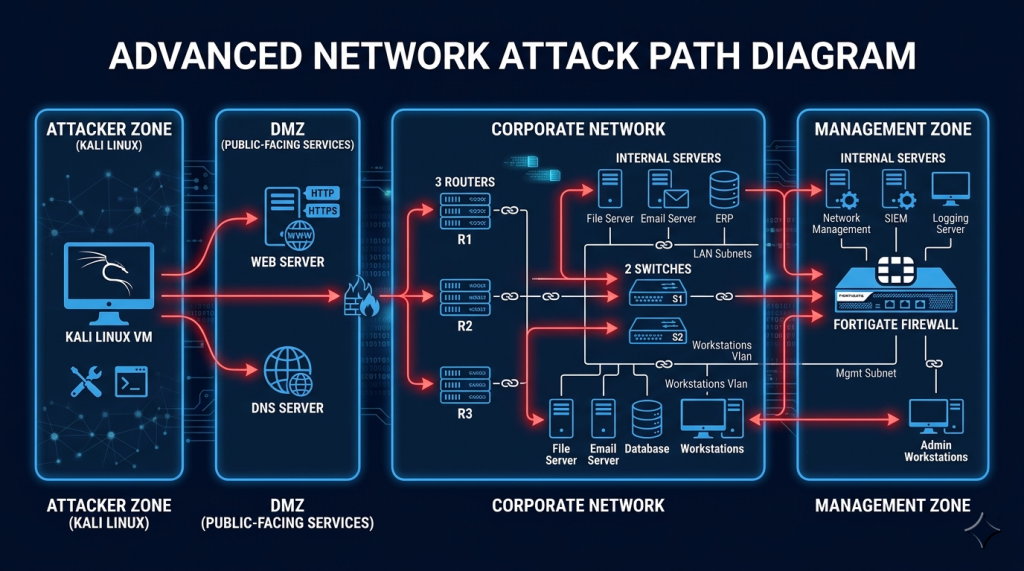
Build a simulated corporate network topology in GNS3 — with real Cisco IOS routers, a FortiGate firewall, and a vulnerable server — then attack it from a Kali Linux VM connected to the same topology. Every firewall rule you bypass, every routing protocol you exploit, every VLAN you pivot through behaves exactly as it would in a real environment.
Firewall and ACL Testing
Configure real FortiGate, ASA, or pfSense images in GNS3 and test whether your security policies actually block the traffic you think they block. This is significantly more reliable than Packet Tracer’s simulated behavior — and it’s exactly how network security engineers validate their configurations before deploying to production.
Protocol Attack Simulation
Test routing protocol attacks (BGP hijacking, OSPF poisoning), VLAN hopping, STP manipulation, and CDP/LLDP information disclosure against real protocol implementations. Understanding these attacks at the protocol level makes you a significantly better network security engineer — and a significantly better penetration tester.
CCNP and CCIE Lab Preparation
GNS3 with real IOS images is the standard environment for CCNP and CCIE lab exam preparation. The Cisco Modeling Labs (CML) subscription is the official Cisco alternative, but GNS3 with community-sourced images has been the community standard for years.
Supported Device Images
| Vendor / OS | Image Type | Notes |
|---|---|---|
|
Cisco IOS |
IOU / IOSv / IOSvL2 |
Requires Cisco license — community sources available |
|
Cisco ASA |
ASAv |
Firewall simulation for CCNP Security prep |
|
Fortinet FortiGate |
FortiOS VM |
Free eval license from Fortinet |
|
Juniper JunOS |
vSRX / vMX |
Requires Juniper license or trial |
|
Palo Alto |
PAN-OS |
Requires vendor license |
|
Kali Linux / Ubuntu |
QEMU VM |
Free — run full Linux VMs in your GNS3 topology |
|
pfSense / OPNsense |
QEMU VM |
Free — excellent for firewall testing and IDS/IPS |
Pricing
| Component | Cost | Notes |
|---|---|---|
|
GNS3 software |
Free |
Open-source, download from gns3.com |
|
GNS3 VM (VMware/VirtualBox) |
Free |
Recommended for running device appliances |
|
Cisco IOS images |
Requires Cisco license |
Community sources exist — legal grey area |
|
FortiGate VM |
Free eval license from Fortinet |
30-day eval, renewable, full feature access |
|
MikroTik CHR |
Free for testing |
No license required for basic use |
|
GNS3 Academy training |
Free on gns3.com |
Official tutorials and course content |
Certification Prep — What GNS3 Helps With
| Certification | How GNS3 Helps |
|---|---|
|
CCNP Security |
Real IOS and ASA images — behavior matches actual exam environment |
|
CCIE Security |
The standard community practice environment for CCIE lab exam prep |
|
Fortinet NSE 4–7 |
FortiGate VM integration — real FortiOS behavior for NSE lab practice |
|
MikroTik MTCRE/MTCSE |
CHR images — real RouterOS behavior for advanced MikroTik exam prep |
|
CompTIA Network+ |
More advanced than needed for N+, but teaches real protocol behavior |
|
Penetration Testing (OSCP) |
Build realistic target networks for network attack practice |
Recommended Resources
- GNS3 — official download, documentation, and free Academy courses
- GNS3 Vault (YouTube) — most comprehensive GNS3 tutorial channel, beginner to advanced
- David Bombal (YouTube) — GNS3 setup guides and network security lab tutorials
- GNS3 Community — official forum with topology sharing and troubleshooting
- FortiGate VM eval license — free GNS3-compatible FortiGate image
- MikroTik CHR download — free RouterOS images for GNS3
── SecVerse Marketplace — Resources ──
Which Platform is Right for You?
GNS3 is the right choice when you need real network operating system behavior for advanced certification prep. Here is how it compares:
| If you want... | Best Choice |
|---|---|
|
You are a beginner learning CCNA networking concepts |
Cisco Packet Tracer — simpler, faster, official CCNA tool |
|
You want paid official Cisco virtual labs with support |
Cisco Modeling Labs (CML) — official Cisco platform, from $199/year |
|
You want offensive security practice on network targets |
Hack The Box — network machines and Pro Labs |
|
You want free real IOS emulation for CCNP and CCIE prep |
GNS3 — this is the right choice |
How to Get Started
- Install GNS3 and the GNS3 VM together. Download both GNS3 (the GUI) and the GNS3 VM from gns3.com. The VM handles device appliances more reliably than running them directly on your host. Follow the official installation guide — it takes about 30 minutes.
- Start with free images — MikroTik CHR and pfSense. Don’t spend time hunting for Cisco IOS images on day one. MikroTik CHR and pfSense are completely free, work perfectly in GNS3, and teach the same routing and firewall concepts. Build a simple topology with them first.
- Build a complete attack/defense lab topology. Once comfortable, create a three-zone topology: an attacker zone (Kali VM), a firewall (FortiGate or pfSense), and a target network (routers, switches, a vulnerable server). Attack your own network. Fix the holes. Attack it again. This is how you learn network security.
📌 Note: The information on this page — including certification details, exam codes, pricing, and salary ranges — is regularly reviewed and updated to reflect the latest data from official sources. Always verify current details directly with the relevant certification body or platform before making any decisions.
Community & Support
── GNS3 Communities ──
Related Articles
The 6 Learning Paths Every Cybersecurity Beginner Should Know
Affiliate Disclaimer: Some links in this article are affiliate links. This means if you click a link and make a purchase, SecVerse may earn a small commission — at no extra cost to you. We only recommend tools we genuinely believe in and that we consider useful for your cybersecurity learning journey. Our editorial opinions are never influenced by affiliate relationships. Introduction: **In our first guide**, we covered how to start learning cybersecurity without feeling overwhelmed. If you haven’t read it yet, start there. Now, let’s talk about which path to take once you’re ready. When I decided to get into cybersecurity 20 years ago after I graduated from school of engineering as computer engineer, I had no idea which path to take. I bought a CEH course first. Then I bought a Security+ book. Then I tried to learn networking. I was all over the place. Don’t be me.

How to Start Learning Cybersecurity Without Feeling Overwhelmed
Affiliate Disclaimer: Some links in this article are affiliate links. This means if you click a link and make a purchase, SecVerse may earn a small commission — at no extra cost to you. We only recommend tools we genuinely believe in and that we consider useful for your cybersecurity learning journey. Our editorial opinions are never influenced by affiliate relationships. Introduction: The Overwhelm is Real (But Avoidable) Let’s be honest with ourselves to avoid the shock and be realistic. Cyber security is huge, branching, and massive field. When I decided to get and start in this field 20 years ago. I made every mistake imaginable: Bought expensive courses I never finished. Tried to learn everything at once – pentesting, malware analysis, cloud security, forensics. All in short time. Got trapped in “tutorial”- watching videos for hours but never actually doing anything because of not practicing them and being confused.